> ## Documentation Index
> Fetch the complete documentation index at: https://docs.concretehq.com/llms.txt
> Use this file to discover all available pages before exploring further.
# Overview
> Track key metrics across your portfolio companies over time
[Trackers](https://app.concretehq.com/trackers) let you define the metrics that matter to your fund — things like ARR, cash balance, runway, or investor asks, and monitor them across your entire portfolio as companies send updates.
Concrete automatically extracts tracker values from emails, files, and meeting transcripts as they arrive. You can also enter or adjust values manually at any time.
View and manage your trackers in the Concrete app
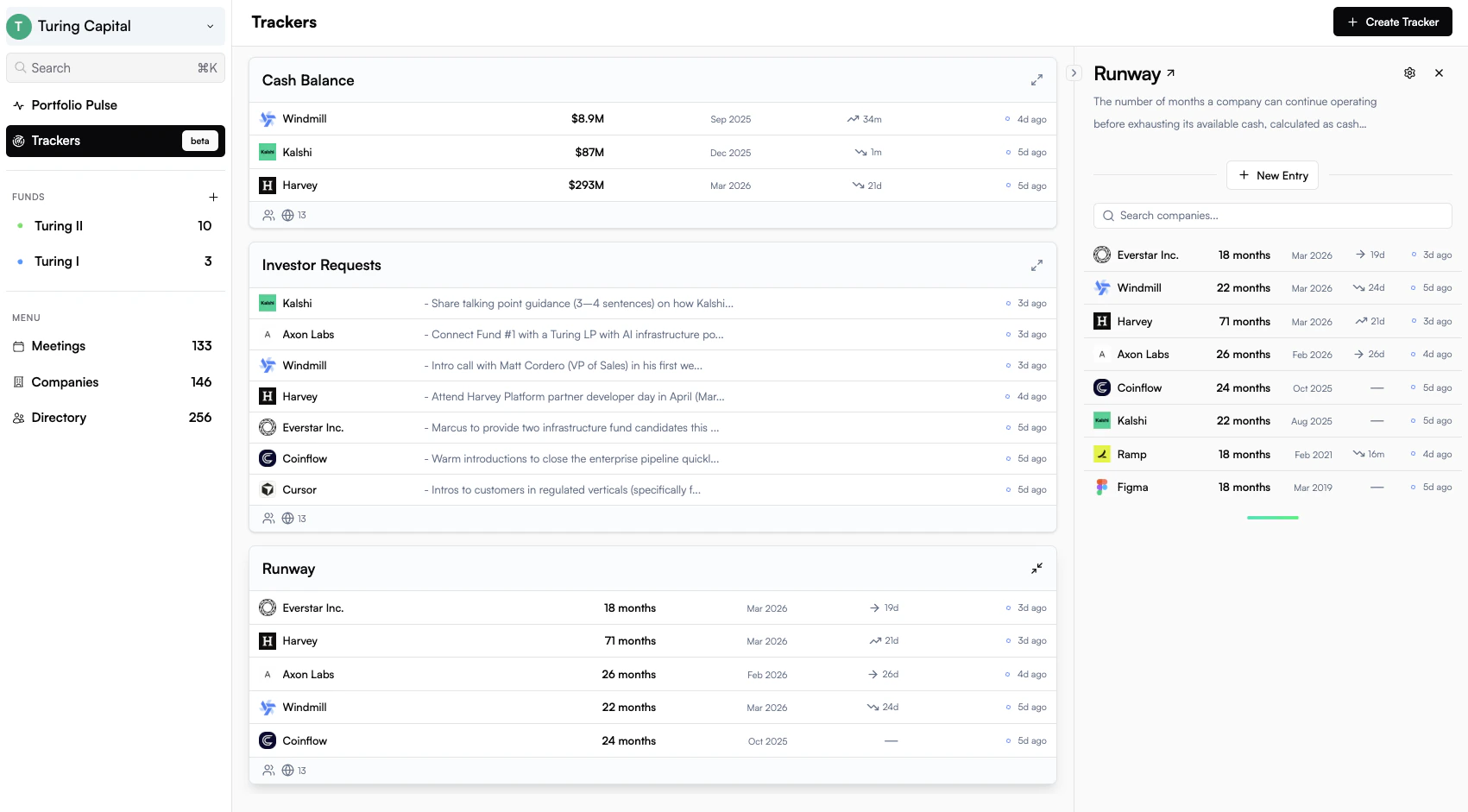 Trackers are flexible by design. Track ARR specifically, or keep it broad with a general revenue tracker. Use a dedicated monthly burn tracker, or a text-based financial health tracker that captures whatever founders share. The right level of specificity depends on your team's needs.
***
## Default Trackers
When you join Concrete, three trackers are set up for you automatically:
* **Cash Balance**: total cash and cash equivalents held by a company at a point in time
* **Runway**: how many months of operating runway a company has remaining
* **Investor Requests**: a collected list of asks and introductions founders are seeking from their investors
These defaults cover the most commonly tracked metrics across venture portfolios and are ready to use immediately. You can customize them or add your own.
***
## Creating a Tracker
Trackers are created with the help of AI. You describe what you want to track in plain language and Concrete generates the tracker configuration for you.
From the **Trackers** tab, click **New Tracker** and describe what you want to track, for example, *"monthly ARR"* or *"headcount by quarter"*.
Concrete generates a tracker with a name, type, and extraction instructions. Review the preview and refine any details before saving.
Choose which companies the tracker applies to and who on your team can see it.
Publish the tracker to begin collecting values. Concrete will backfill values from existing content automatically.
***
## Tracking Values Over Time
Every tracker maintains a history of values for each portfolio company. As new emails, board decks, and investor updates arrive, Concrete's extraction agent scans the content and adds new values to the timeline automatically.
You can also:
* **Enter values manually** from the company's tracker panel
* **Edit or override** an extracted value if needed
* **View the full timeline** to see how a metric has trended over time
Trackers are most powerful when you have regular investor updates flowing through Concrete. The more content Concrete processes, the more values it can extract automatically.
***
## Visibility and Scope
When creating a tracker, you control who can see it (**Team** or **Private**) and which companies it applies to (**All**, **All with exclusions**, or **Selected**). See the [Reference →](/trackers/reference) for full details on all options.
***
## Audit Trail
Every tracker value has a status so you can tell at a glance what's been verified and what came from where:
* ○ **Suggested**: extracted by AI, pending review
* ● **Approved**: AI suggestion confirmed by a team member
* ● **Submitted**: entered directly by a team member
* ● **Rejected**: AI-extracted but dismissed after review
AI-extracted values also include citations and quoted evidence linking back to the source. See [Audit Trail →](/trackers/audit-trail) for more detail.
Trackers are flexible by design. Track ARR specifically, or keep it broad with a general revenue tracker. Use a dedicated monthly burn tracker, or a text-based financial health tracker that captures whatever founders share. The right level of specificity depends on your team's needs.
***
## Default Trackers
When you join Concrete, three trackers are set up for you automatically:
* **Cash Balance**: total cash and cash equivalents held by a company at a point in time
* **Runway**: how many months of operating runway a company has remaining
* **Investor Requests**: a collected list of asks and introductions founders are seeking from their investors
These defaults cover the most commonly tracked metrics across venture portfolios and are ready to use immediately. You can customize them or add your own.
***
## Creating a Tracker
Trackers are created with the help of AI. You describe what you want to track in plain language and Concrete generates the tracker configuration for you.
From the **Trackers** tab, click **New Tracker** and describe what you want to track, for example, *"monthly ARR"* or *"headcount by quarter"*.
Concrete generates a tracker with a name, type, and extraction instructions. Review the preview and refine any details before saving.
Choose which companies the tracker applies to and who on your team can see it.
Publish the tracker to begin collecting values. Concrete will backfill values from existing content automatically.
***
## Tracking Values Over Time
Every tracker maintains a history of values for each portfolio company. As new emails, board decks, and investor updates arrive, Concrete's extraction agent scans the content and adds new values to the timeline automatically.
You can also:
* **Enter values manually** from the company's tracker panel
* **Edit or override** an extracted value if needed
* **View the full timeline** to see how a metric has trended over time
Trackers are most powerful when you have regular investor updates flowing through Concrete. The more content Concrete processes, the more values it can extract automatically.
***
## Visibility and Scope
When creating a tracker, you control who can see it (**Team** or **Private**) and which companies it applies to (**All**, **All with exclusions**, or **Selected**). See the [Reference →](/trackers/reference) for full details on all options.
***
## Audit Trail
Every tracker value has a status so you can tell at a glance what's been verified and what came from where:
* ○ **Suggested**: extracted by AI, pending review
* ● **Approved**: AI suggestion confirmed by a team member
* ● **Submitted**: entered directly by a team member
* ● **Rejected**: AI-extracted but dismissed after review
AI-extracted values also include citations and quoted evidence linking back to the source. See [Audit Trail →](/trackers/audit-trail) for more detail.